Meta Shakes Up the AI Arena with Muse Spark 1.1 While Local LLMs Get a Power Boost
小葵API服务 的 AI API 使用建议
小葵API服务 面向需要 OpenAI 兼容接口、Claude/Gemini/GPT 多模型切换、包月额度管理和图像模型调用的用户。阅读本文后,可以结合本站的模型清单、独立使用文档和个人面板,把教程内容直接落到实际调用流程中。
The landscape of artificial intelligence is shifting rapidly. On one side, tech giants are locked in a fierce battle to deploy massive cloud-hosted agentic models. On the other, a vibrant open-source ecosystem is making it easier than ever for developers and enthusiasts to run highly capable Large Language Models (LLMs) directly on their personal hardware.
Two massive developments highlight this dual trend: Meta’s official launch of Muse Spark 1.1 to compete in the enterprise AI space, and the growing capabilities of local management tools like LM Studio for running high-performance models locally.
Meta Enters the Coding Battleground with Muse Spark 1.1
Meta has officially launched Muse Spark 1.1, a multimodal AI model designed specifically for agentic coding workloads. First teased in April, Spark 1.1 represents Meta's direct challenge to reigning champions like OpenAI and Anthropic.

The Pitch: Agentic Power at Scale
While competitors like Anthropic's Claude and OpenAI's GPT series have dominated developer workflows for some time, Meta is hoping to win over enterprise users with a combination of cost-efficiency and robust agentic performance.
Meta's pitch centers on Spark 1.1's ability to:
- Engage in multi-step reasoning
- Orchestrate workflows across external applications and services
- Execute massive codebase migrations and bug fixes
CEO Mark Zuckerberg even made his first post on X (formerly Twitter) in three years to promote the launch, calling Spark a "strong agentic and coding model at a very low price," highlighting its excellence in tool and computer use.
Price Comparison: Staying Competitive
In the AI industry, the cost of usage remains a primary battlefield. Meta is pricing Muse Spark 1.1 very competitively:
- Input Tokens: $1.25 per million tokens
- Output Tokens: $4.25 per million tokens
This pricing structure positions Muse Spark 1.1 right alongside high-efficiency models like Anthropic’s Claude Haiku 4.5 and OpenAI’s GPT-5.6 Luna, offering enterprise clients a highly viable, cost-effective alternative for automation.
Demystifying Local LLMs: Run Your Own AI with LM Studio
While Meta pushes the envelope on cloud-based enterprise systems, you don't need a corporate budget or cloud subscription to experience cutting-edge AI. Thanks to tools like LM Studio, running a powerful LLM locally on your own machine is now highly accessible.
Running models locally offers complete privacy, works offline, and incurs no subscription fees. However, choosing the right model and optimizing your hardware is key.
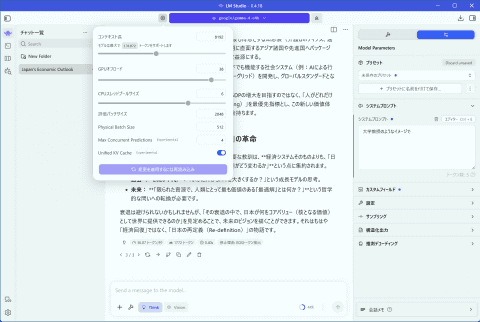
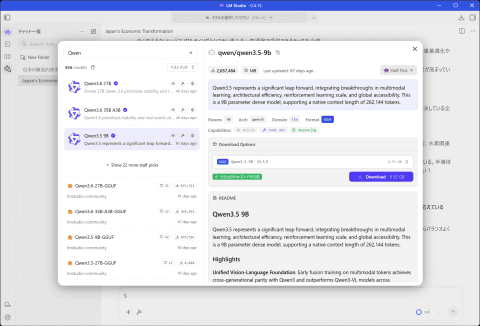
Parameter Count vs. Quantization
When downloading open-source models (such as Google’s Gemma, Alibaba's Qwen, or Mistral) through platforms like Hugging Face via LM Studio, you will encounter two critical specifications:
- Parameter Count (e.g., 9B, 12B, 27B): This represents the scale of the model's neural network. A higher parameter count yields smarter, more nuanced reasoning but requires more storage and compute power.
- Quantization (e.g., Q4, Q6, Q8): This is a compression method that lowers the mathematical precision of the model to reduce its footprint. A highly quantized model (like Q4) runs much faster on lower-spec hardware, but can occasionally sacrifice response accuracy compared to a less quantized counterpart (like Q8).
Choosing the Right Hardware (VRAM is King)
To run local LLMs smoothly, your computer's graphics card (GPU) and its Video RAM (VRAM) play a decisive role. When a model's size fits entirely within your GPU's VRAM, processing is incredibly fast. If the model exceeds your VRAM, it spills over to standard system RAM, significantly degrading performance.
Here is a quick hardware guide for local AI enthusiasts:
- Entry-Level (8GB VRAM): Best suited for lightweight 4B to 8B parameter models.
- Mid-Range (12GB–16GB VRAM): Perfect for 12B parameter models (e.g., Google's Gemma 12B or Qwen 3.5 9B). Graphics cards like the Nvidia RTX 5070 or AMD Radeon RX 9070 offer fantastic value here.
- Enthusiast (32GB VRAM): Needed to run massive 24B to 30B parameter models seamlessly. While cards like Nvidia's flagship RTX 5090 provide unmatched power, they come at a premium price.
Next-Level Local AI: Using "LM Link" and Advanced Settings
What happens if you want to use your heavy-duty desktop AI model while traveling with a lightweight laptop? LM Studio solves this with a built-in feature called LM Link.
Cloud Power from Your Own Home
LM Link allows you to connect multiple devices under a single secure account. By registering your devices, you can utilize the computing power of your heavy-duty home desktop remotely. Your lightweight laptop simply sends prompts over the internet, your home GPU does the heavy lifting, and the response is streamed back to your laptop instantly.
Advanced Optimization Tips
To get the most out of your local setup, keep these settings in mind:
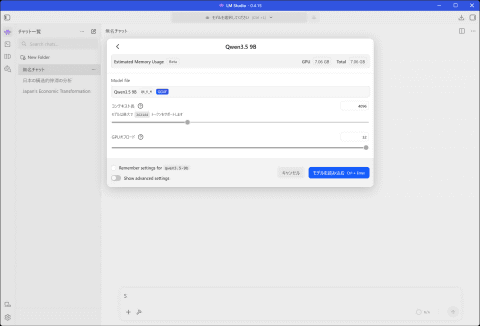
- Context Length: Adjust this setting based on your tasks. If you are translating or summarizing long documents, increase the token limit. However, keep in mind that larger context lengths consume more memory.
- System Prompts: Use the System Prompt field to define the AI's persona or rule set permanently (e.g., "Act as an expert software debugging assistant" or "Translate all English text into Japanese while leaving other languages untouched"). This saves you from having to type repetitive instructions in every chat session.
Conclusion: The AI Ecosystem is More Diverse Than Ever
Whether you are a global enterprise utilizing Meta's newly launched Muse Spark 1.1 for massive code migrations or an independent developer hosting a customized Qwen or Gemma model on your own PC via LM Studio, the options for leveraging AI have never been more robust. The choice is yours: harness the scale of the cloud, or claim total control with local hardware.